Numo: NumPy for Ruby

Photo by Jonas Svidras
NumPy is an extremely popular library for machine learning in Python. It provides an efficient way to work with large, multi-dimensional arrays. What you may not know is Ruby has a library with similar functionality. It’s called Numo, and in this post, we’ll look at what you can do with it.
Basic Operations
Numo’s core data structure is the multi-dimensional array, which has methods for mathematical operations. These operations are written in C, so they’re much faster than performing the same operations in Ruby.
Let’s start by creating a Numo array from a Ruby array.
x = Numo::DFloat.cast([[1, 2, 3], [4, 5, 6]])
Each array has shape. We created a 2x3 2D array, but arrays can be 1D, 3D, or more.
x.shape # [2, 3]
Read a row or column with:
x[0, true] # 1st row - [1, 2, 3]
x[true, 2] # 3rd column - [3, 6]
We can add a constant value:
x + 2 # [[3, 4, 5], [6, 7, 8]]
Or add arrays:
x + x # [[2, 4, 6], [8, 10, 12]]
Some operations like mean and sum can be run over a specific axis.
x.sum(0)  # sum of each column - [5, 7, 9]
x.mean(1) # mean of each row - [2, 5]
We can also change its shape - useful for preparing data for models.
x.reshape(3, 2) # [[1, 2], [3, 4], [5, 6]]
If you’re familiar with NumPy operations, there are side-by-side examples and a table showing how the functions map.
Building Models
Rumale is a machine learning library similar to Python’s Scikit-learn. It uses Numo for inputs and outputs. Here’s a basic example of linear regression.
# generate data: y = 1 + 2(x0) + 3(x1)
x = Numo::DFloat.asarray([[0, 1], [1, 0], [1, 2]])
y = 1 + 2 * x[true, 0] + 3 * x[true, 1]

# train
model = Rumale::LinearModel::LinearRegression.new(
          fit_bias: true, max_iter: 10000)
model.fit(x, y)

# predict
model.predict(x)
Rumale has many, many models and other useful tools for:
- Regression: linear, ridge, lasso, support vector machines
- Classification: logistic regression, naive Bayes, K-nearest neighbors, support vector machines
- Clustering: K-means, Gaussian mixture model
- Dimensionality reduction: principal component analysis
Scikit-learn has a great cheat-sheet to help you decide what do use:
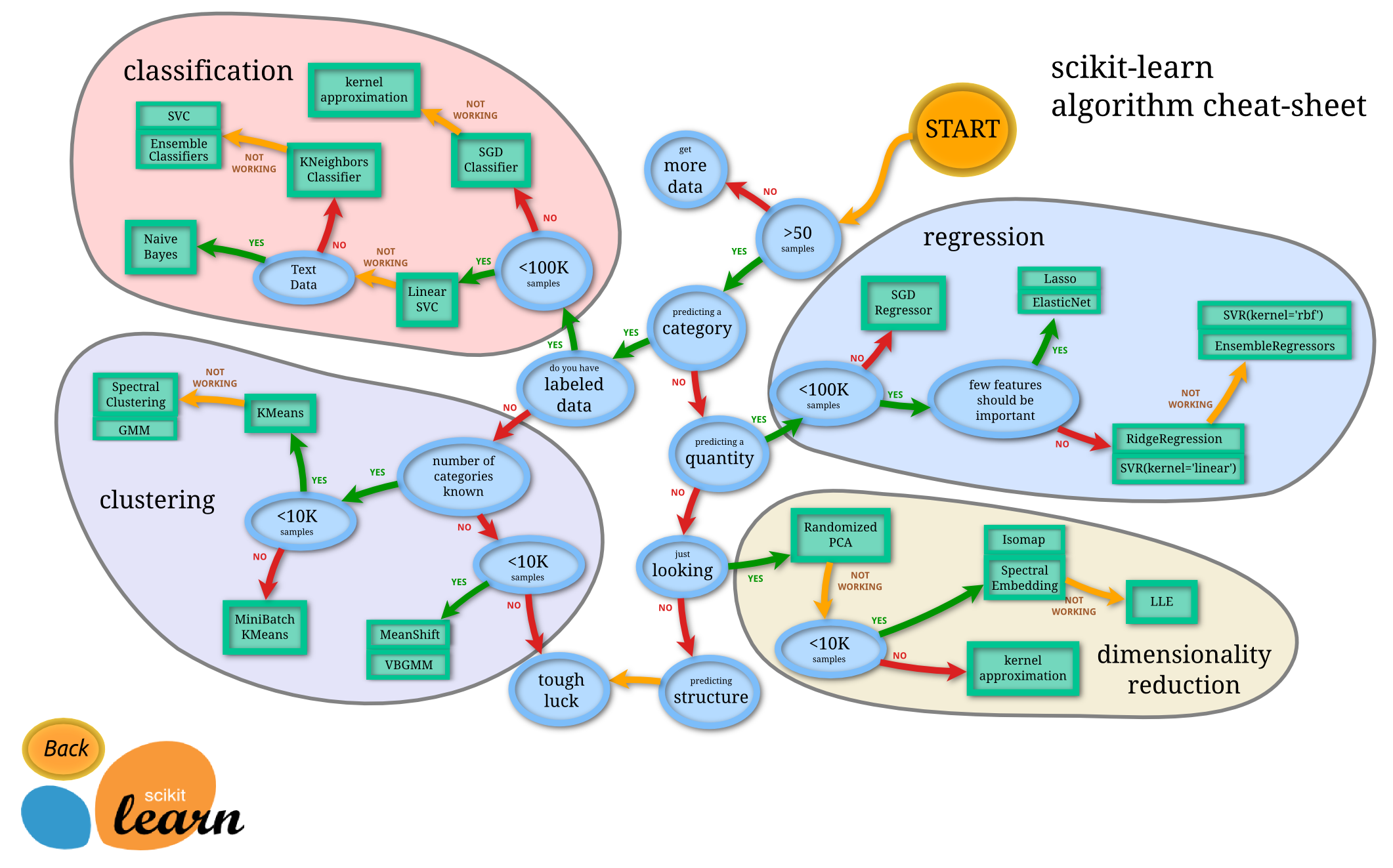
Image from Scikit-learn (BSD License)
Storing Data
Numo arrays can be marshaled just like other Ruby objects. This allows you to save your work and resume it at a later time.
# save
File.binwrite("x.dump", Marshal.dump(x))

# load
x = Marshal.load(File.binread("x.dump"))
Npy allows you to save and load arrays in the same format as NumPy. This is more performant than marshaling.
# save
Npy.save("x.npy", x)

# load
x = Npy.load("x.npy")
It also makes it easy to load datasets like MNIST.
mnist = Npy.load_npz("mnist.npz")
Summary
You now have a basic introduction to Numo and know how to:
- perform basic operations
- build a model
- store data
Consider Numo for your next machine learning project.